Context Action beaTlet
Many of the things we want to do with songs we only want to do with the currently selected songs. So what's the code for manipulating those songs?
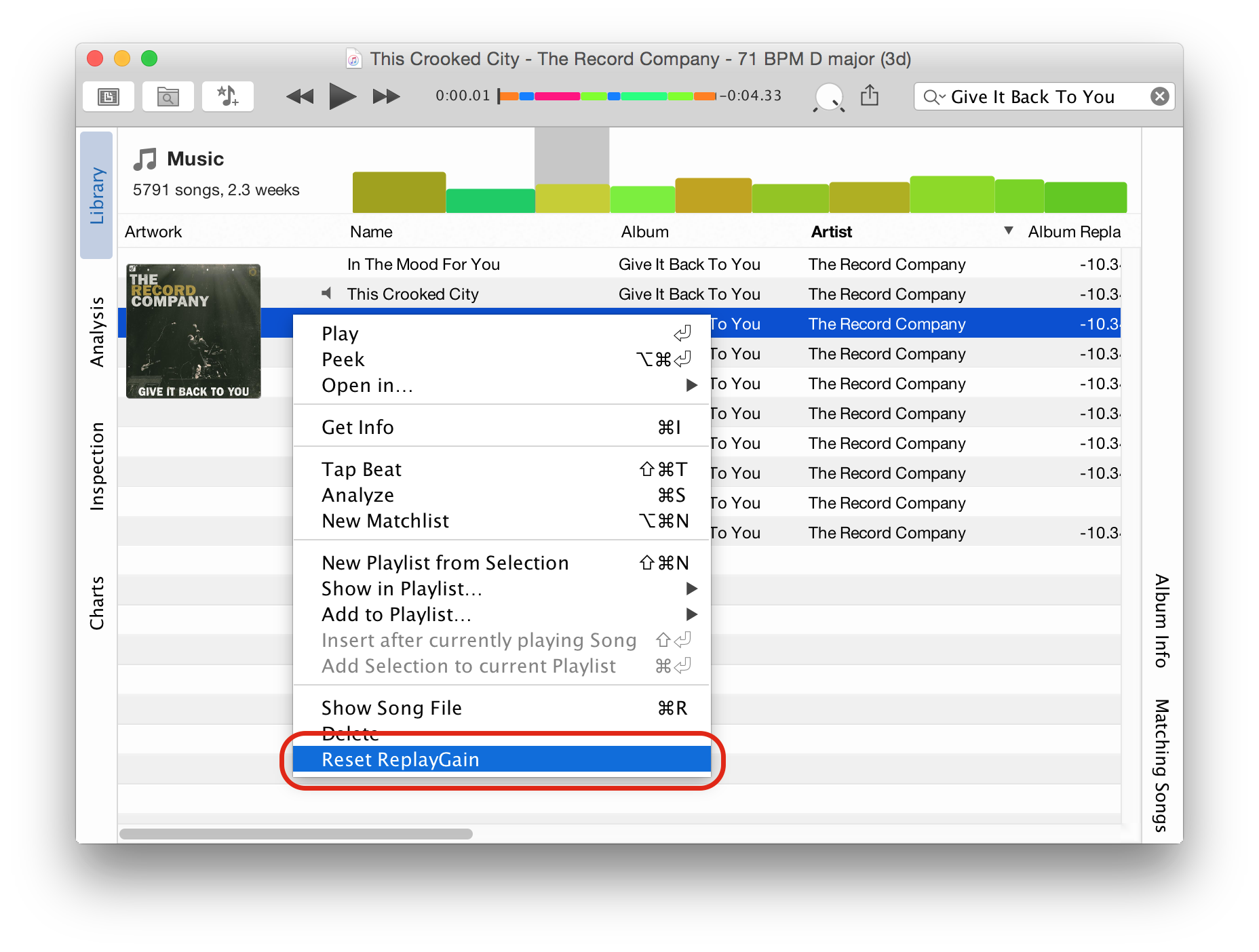
Easy. It's pretty much a regular BaseAction that fetches the currently selected AudioSong ids, looks up the actual song objects and then does something with them. To demonstrate how it's done, we're going to show a simple action that resets the ReplayGain values for the selected songs:
from javax.swing import Action
from com.tagtraum.core.app import AbsoluteActionLocation
from com.tagtraum.core.app import ActionLocation
from com.tagtraum.beatunes.action import BaseAction
from com.tagtraum.beatunes.action import BeaTunesUIRegion
from com.tagtraum.beatunes.songtable import SongPropertyChangeListener
# Needed for Java array creation
from jarray import array

class ResetReplayGain(BaseAction):

    def getId(self):
        return "Jython.ResetReplayGain"

    def init(self):
        self.putValue(Action.NAME, "Reset ReplayGain")

    # Install the action in both the Tools menu and the context
    # menu of the main table.
    def getActionLocations(self):
        # Java array creation via array([], type)
        return array([
        AbsoluteActionLocation(BeaTunesUIRegion.TOOL_MENU, AbsoluteActionLocation.LAST),
        AbsoluteActionLocation(BeaTunesUIRegion.SONG_CONTEXT_MENU, AbsoluteActionLocation.LAST)
        ], ActionLocation)

    def actionPerformed(self, actionEvent):
        # get ids for the selected songs
        ids = self.getSelectedSongIds()
        for id in ids:
            # obtain the AudioSong object
            # special cast to java.lang.Long necessary!!
            song = self.getApplication().getMediaLibrary().getSong(id)
            # register a SongPropertyChangeListener, so that
            # any changes are displayed right away.
            song.addPropertyChangeListener(
            SongPropertyChangeListener(self.getApplication().getMainWindow().getSongTable().getTable(), id)
            )
            # do something with the object.
            # don't forget that you are on the EDT!
            # so whatever you do here, should be quick.
            # if not, start a new thread for your work.
            song.setAlbumReplayGain(None, False)
            song.setTrackReplayGain(None, True)
import javax.swing.*
import java.awt.event.ActionEvent
import com.tagtraum.audiokern.*
import com.tagtraum.core.app.*
import com.tagtraum.beatunes.action.*
import com.tagtraum.beatunes.songtable.SongPropertyChangeListener

class ResetReplayGain extends BaseAction {

    def String getId() {
        "Groovy.ResetReplayGain"
    }

    def void init() {
        putValue(Action.NAME, "Reset ReplayGain")
    }

    /**
     * Install the action in both the Tools menu and the context
     * menu of the main table.
     */
    def ActionLocation[] getActionLocations() {
        [new AbsoluteActionLocation(BeaTunesUIRegion.TOOL_MENU, AbsoluteActionLocation.LAST),
        new AbsoluteActionLocation(BeaTunesUIRegion.SONG_CONTEXT_MENU, AbsoluteActionLocation.LAST)]
    }

    def void actionPerformed(ActionEvent actionEvent) {
        // get ids for the selected songs
        long[] ids = getSelectedSongIds()
        for (long id : ids) {
            // obtain the AudioSong object
            AudioSong song = getApplication().getMediaLibrary().getSong(id)
            // register a SongPropertyChangeListener, so that
            // any changes are displayed right away.
            song.addPropertyChangeListener(new SongPropertyChangeListener(getApplication().getMainWindow().getSongTable().getTable(), id))
            // do something with the object.
            // don't forget that you are on the EDT!
            // so whatever you do here, should be quick.
            // if not, start a new thread for your work.
            song.setAlbumReplayGain(null, false)
            song.setTrackReplayGain(null, true)
        }
    }
}
require 'java'

java_import javax.swing.Action

java_import com.tagtraum.core.app.ActionLocation
java_import com.tagtraum.core.app.AbsoluteActionLocation

java_import com.tagtraum.beatunes.action.BeaTunesUIRegion
java_import com.tagtraum.beatunes.action.BaseAction
java_import com.tagtraum.beatunes.songtable.SongPropertyChangeListener

class ResetReplayGain < BaseAction

    def getId
        "JRuby.ResetReplayGain"
    end

    def init()
        putValue(Action.NAME, "Reset ReplayGain")
    end

    # Install the action in both the Tools menu and the context
    # menu of the main table.
    def getActionLocations()
        # "to_java()" converts the Ruby array into a Java array of the given type
        [
            AbsoluteActionLocation.new(BeaTunesUIRegion::TOOL_MENU, AbsoluteActionLocation::LAST),
            AbsoluteActionLocation.new(BeaTunesUIRegion::SONG_CONTEXT_MENU, AbsoluteActionLocation::LAST)
        ].to_java(ActionLocation)
    end

    def actionPerformed(actionEvent)
        # get ids for the selected songs
        ids = getSelectedSongIds()
        for id in ids
            # obtain the AudioSong object
            # special cast to java.lang.Long necessary!!
            song = getApplication().getMediaLibrary().getSong(id.to_java(java.lang.Long))
            # register a SongPropertyChangeListener, so that
            # any changes are displayed right away.
            song.addPropertyChangeListener(
                SongPropertyChangeListener.new(getApplication().getMainWindow().getSongTable().getTable(), id)
            )
            # do something with the object.
            # don't forget that you are on the EDT!
            # so whatever you do here, should be quick.
            # if not, start a new thread for your work.
            song.setAlbumReplayGain(nil, false)
            song.setTrackReplayGain(nil, true)
        end
    end
end
/*
 * These type vars basically act as imports for Java classes.
 */
var Action = Java.type("javax.swing.Action");
var ActionLocations = Java.type("com.tagtraum.core.app.ActionLocation[]");
var AbsoluteActionLocation = Java.type("com.tagtraum.core.app.AbsoluteActionLocation");
var BeaTunesUIRegion = Java.type("com.tagtraum.beatunes.action.BeaTunesUIRegion");
var BaseAction = Java.type("com.tagtraum.beatunes.action.BaseAction");
var SongPropertyChangeListener = Java.type("com.tagtraum.beatunes.songtable.SongPropertyChangeListener");

// BaseAction is an abstract class.
// This allows us to subclass it with "new".
// The resulting subclass instance is stored in the "beatlet" variable.
var beatlet = new BaseAction() {

    /*
     * Unique id.
     */
    getId: function() {
        return "Javascript.ResetReplayGain";
    },

    /*
     * Is called by beaTunes as part of the lifecycle after instantiation.
     * At this point all other plugins are instantiated and registered.
     * We use this to set the menu item's (i.e. the action's) name.
     */
    init: function() {
        beatletSuper.putValue(Action.NAME, "Reset ReplayGain");
    },

    /*
     * Define, where in the UI the Action should appear.
     * You can define multiple locations in an array. Here, we
     * request to be the last item in the Tool and the Context menu.
     * Note, that we use the Nashorn extension "Java.to", to
     * create a Java array.
     */
    getActionLocations: function() {
        return Java.to(
            [
                new AbsoluteActionLocation(BeaTunesUIRegion.TOOL_MENU, AbsoluteActionLocation.LAST),
                new AbsoluteActionLocation(BeaTunesUIRegion.SONG_CONTEXT_MENU, AbsoluteActionLocation.LAST),
            ], ActionLocations
        );
    },

    /*
     * React to a click on the menu item.
     */
    actionPerformed: function(actionEvent) {
        // get ids for the selected songs (this is an array of type long)
        var ids = beatletSuper.getSelectedSongIds()
        for (var i=0; i<ids.length; i++) {
            // obtain the AudioSong object
            var song = beatletSuper.getApplication().getMediaLibrary().getSong(ids[i]);
            // register a SongPropertyChangeListener, so that
            // any changes are displayed right away.
            song.addPropertyChangeListener(new SongPropertyChangeListener(beatletSuper.getApplication().getMainWindow().getSongTable().getTable(), ids[i]));
            // do something with the object.
            // don't forget that you are on the EDT!
            // so whatever you do here, should be quick.
            // if not, start a new thread for your work.
            song.setAlbumReplayGain(null, false);
            song.setTrackReplayGain(null, true);
        }
    }
}

// Find super class of beatlet, so that we can call methods on it
// in the "actionPerformed" function.
var beatletSuper = Java.super(beatlet);

// Put "beatlet" into the last line, so that it is returned
// to beaTunes when this script is eval'd.
beatlet;
Other beaTlet samples:
- Getting Started
- Library Batch Action
- Playlist Exporter
- Song Analysis Task
- beaTlet Plugin Descriptor
- Song Context View
- Song Property Analyzer
All sample beaTlets are also on
GitHub
 .
.